
Stop before clearing data, uninstalling a PWA or overwriting a working copy. This guide does not read, upload or repair a save. It helps you preserve evidence and choose the safest next step.
Build a privacy-safe recovery report
Choose only non-sensitive facts. This tool runs in your browser and does not inspect or upload a save.
Safety rules before troubleshooting
Never paste a password, session token, room code, email address or save file into this Wiki. Do not edit a database, import unknown scripts or keep retrying writes against the only browser profile that still shows your progress.
If one browser, profile or device still shows the correct account, leave it open and unchanged. Record only non-sensitive facts such as browser name, device type, visible nickname, approximate time and the exact error text.
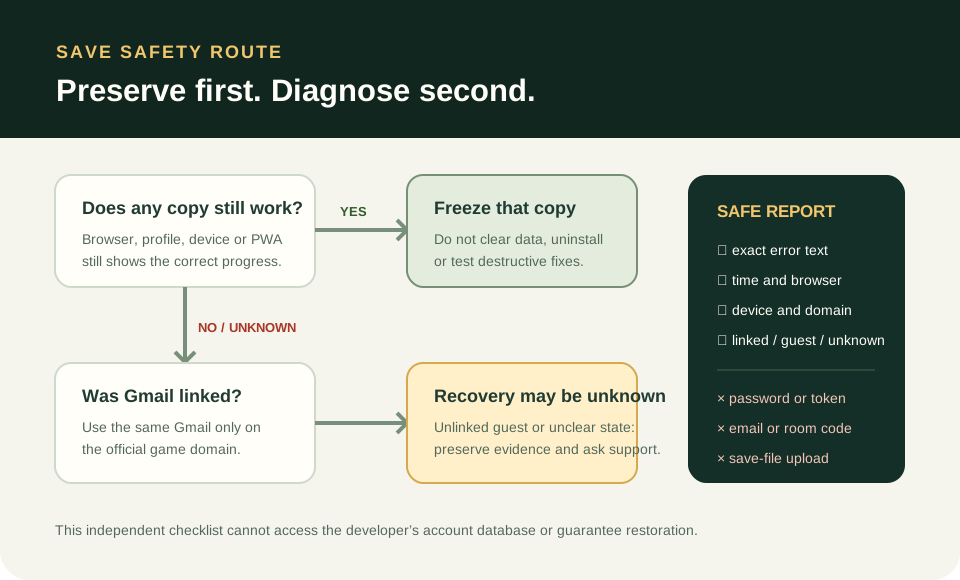
Choose the safest branch
| What you still have | Safest next step | Avoid |
|---|---|---|
| A linked Gmail account | Use Sign in with Google with that same Gmail on the official domain | Creating a second account with a different identity |
| A username/password account previously linked to Gmail | Use the linked Gmail route described in the October 14 changelog | Sending credentials to a helper site |
| One browser copy still shows progress | Preserve that browser/profile and document the visible account state | Clearing site data, uninstalling the PWA or testing destructive fixes |
| Only an unlinked guest session | Keep the original browser/profile intact and contact the developer with non-sensitive facts | Assuming the save can move to another browser |
| No surviving copy and linkage is unknown | Treat recovery as unknown; collect the error and account history for support | Claiming a guaranteed restoration method |
No matches. Try another name or reset the filters.
Paused to protect your progress and 409 reports
Issue #185 is a player report describing “Paused to protect your progress” together with a 409 response while setting a name. The report says private browsing and another browser did not solve it. This is evidence of one reported symptom, not a confirmed universal cause or a recovery guarantee.
Preserve any browser that still displays progress. Note the exact message, time, browser and whether the account was linked. Use the diagnostic below to create a non-sensitive report; submit it only through the developer’s official support or issue tracker.
What the October 14 Gmail change means
The official changelog says an existing username/password account can be linked to Gmail, and Sign in with Google with that Gmail should then open the same account. It also warns that an unlinked account cannot be recovered through that Google route.
Account linking is preventive. It does not prove that an unlinked guest save can be reconstructed after browser data is gone, and this independent Wiki has no access to the developer’s account database.
Additional source
Official October 14 account-linking changelog
Player report: Paused to protect your progress / 409 (issue #185)
Sources & snapshot scope
Reference reviewed 2026-10-18. Mechanics and data were checked against the named source snapshot. Source inspection is separate from gameplay testing. 5bbc3b2.